Galaxy Tab or iPad?

0 comments

Confused which one to choose, Galaxy Tab or iPad? What is a great PC Tablet series which it can use to make a call, SMS (short message system) and also have a friendly price?

Tablet PC is a lot of variety and its variants. Moreover Samsung, whose products (Galaxy Tab) have many types with different features.

Samsung Tablet (Galaxy Tab) have a different platform with homemade Apple, iPad. Galaxy Tab with Android-based, while the iPad with iOS platform.

If you are looking for a tablet that can be enabled for calls and SMS as well as mobile phones, the iPad is not the solution. Sure, the iPad 3G has a SIM card slot, but can only be used for Internet data access only. (tricked by some third party applications such as TextNow, TextPlus, TextFree, SwirlySMS or HeyWire to work like SMS. Then via Skype, for telephone access via the Internet).

Well, the other with the Samsung Galaxy Tab. Samsung Tablet is there a supported phone and SMS capabilities. Call it the P1000 Galaxy Tab, Galaxy Tab 2 (7.0 and 10.1).

In prices, tablet Samsung Galaxy Tab on average cheaper than the Apple iPad. Samsung Galaxy Tab 2 (7.0) P3100 is currently in the range of USD250, while Samsung Galaxy Tab 2 (10.1) is currently in the range of USD398. Compare this with the current iPad is the range of USD500.
Anyway, the choice is all back to you, want to choose which one?

<<<Galaxy Tab or iPad?>>> 

<<<HTC Connect, Play Audio Video from Smartphone to TV>>>

Read more ►

Make Your Photos Fantastic via Free Camera Application (Android OS)

0 comments

Your camera phone shots feel less beautiful? Or you need extra-effect prior to upload photos to Instagram, facebook or other social networking? 3 free android apps will help get the photo you want. Want to add cartoon effects ... or add phantoms can know! lol ;)

So here it is, check it out ..

1. Multi-Camera lens

Take Some Object, Merge
Developer: Tiny Piece Co., Ltd


Multi-Camera lens provides a dual display more than one where you can shoot multiple times and combine them in one photo. So if you want to combine some of the faces, or comparing different objects in one image, the application is most appropriate to use.


Features:
- Take 2 to 6 pictures in one screen
- It has photo sharing facility to popular social networks like facebook
- Have a facility to send photos via email


2. Camera360 Ultimate

Art in the grip
Developer: PinGuo Inc.


Camera 360 has been known as a popular application for mobile phone camera and has been named as one of the most popular application by PC World magazine. With easy operation function, the effects are very interesting, and offer an exceptional user experience for its users to make this application used by over 20 thousand people in just over a year.


In addition to providing dozens of interesting effects, Ultimate Camera 360 also has an interface that is easy to use. With the latest photo processing engine, the process of taking photos and adding effects to be much faster.

In addition, the classification of regular photographs makes it easy to sort photos by date, alphabetically and folders. It supports high-resolution image capture using either the front or back of the camera (depending on hardware camera resolution). Version 3.0 can be used for the Android phone's operating system Froyo v2.2 and above. While support for applications using the front camera can be used on the operating system Froyo v2.3 and above.


3. Cartoon Camera

Make a unique caricature effects
Developer: Fingersoft


Classified as a simple photo application, but has many interesting filter. There is a filter cartoons, sketches, line edge effects, black and white and much more. Offers full-featured free version, though with little advertising inserts.


Cartoon Camera has a few features include:

- Real-time cartoon effect
- 6 effects: Cartoon, Color Drawing, Sepia, White Strokes, Strokes and Dark Colored Edges
- A border can be set thickness
- Color sensitivity / saturation
- Save the image with a single touch
- Supports auto focus (press the sembanrang etmpat on screen)
- Support for camera flash
- Support the front camera (for Android 2.3 and above)


Read more ►

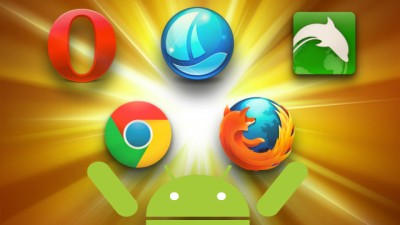
This is the Top 5 Web Browser For Android

0 comments

Indeed there are dozens of good web browser available for Android devices, depending on the features you are looking for. Is sync with your desktop, super-fast browsing, or support for turn navigation, you have an abundance of options. This time, lifehacker has selected 5 best browser for Android devices based on user nominations.

1. Firefox

Firefox for Android has come far since the day of its beta version. Fast, free, fully supports Firefox Sync, so if you use Firefox on the desktop, will lead to your bookmarks and passwords. This is the first mobile browser that actually supports the Do Not Track, and "Awesome Page" start screen that displays all the tabs that you recently visited, so help you get back what you have previous track. It even supports add-ons and Personas.

2. Chrome

Chrome for Android finally left beta last month, meaning can now continue to be a "stock" the new browser on the Android assuming you're running the Android 4.0 Ice Cream Sandwich or above. When you run the ICS or Jelly Bean, Chrome for Android has been downloaded properly. Incognito Mode supports browsing, bookmark syncing via Chrome Sync, and the latest update, now supports the search syncing, tab syncing, and more. Chrome for Android is also optimized for mobile. The only drawback is that Google does not provide one for phones that run the Gingerbread or tablet is stuck with Honeycomb.

3. Dolphin Browser HD / Mini

Option and the Tool of Dolphin unparalleled, even compared with a browser that has a big name. Supports dozens of third-party plug-ins and tools to expand its features, has a built-in speech-to-text thanks to Dolphin Sonar, supports on-screen gestures to open bookmarks and navigate on pages, and comes in two tastes: version "HD" for mobile phones that can handle all of its features, and versions of "Mini" for the owners who want the speed and sharp performance.

4. Boat Browser / Mini

Back to the early days of Android, one of the first browser to challenge the stock browser is Miren - an application that is now gone. Miren is a great browser, and rich in features, but for unknown reasons, are now difficult to find. If you like the Miren, Boat Browser is a spiritual successor. Fast, lightweight, and completely free, supports add-ons, has a powerful engine sound control (so you can say 'Facebook' and the browser will bring up the Facebook for you), and more.

5. Opera Mini

If you are a fan of Opera on the desktop, Opera Mobile will suit you. Opera Mobilesupports Opera Link, so you can synchronize your bookmarks, speed dial, and the preferences of other users by installing the Opera desktop. In addition, Opera Mobile is fast, free, and even has its own mini-app store, filled with third-party add-ons that enhance the browser or the game, so it makes it more fun to use.

So, what is your choice?
Read more ►

This is the Most Common Problems In Latest Smartphone

0 comments

Nothing is perfect! The sentence did not seem to be released when we talk about any device, including smartphones.

Comes with a myriad of neat features and capable operating system, sometimes there are other factors that make these devices so it is not perfect. Call the screen is too small or too large, battery-less qualified, there is even a smartphone that could actually explode when done charging process. It's always been a separate issue when we talk about a minus on the underdog even though the devices.

Recently released a report FixYa, as reported by BGR, reveal the different lists the most common problems that often clung a number of leading smartphones, including iPhone and Samsung Galaxy S 4S III.

In its official release FixYa claims the report was based on data from 25 million users and 15 million product problems and solutions.

Complaints of users iPhone 4S the most common are usually assembled with battery power (45%), followed by Wi-Fi problems (20%), a Bluetooth connection (15%), and Siri (10%).

While for the Galaxy S III 50% of complaints related to the users perceived damage to the microphone, 15% related to battery life, 15% related to the heat level on the device.

Here are details of the smartphone and the five most common problems:

Samsung Galaxy SIII:
1. Microfon damage - 50%
2. Battery Power - 15%
3. Quick Heat Device - 15%
4. Internet connection - 10%
5. Others - 10%

Apple iPhone 4S:
1. Battery - 45%
2. Can not do Wi-Fi Connection - 20%
3. Bluetooth connection - 15%
4. Complaint of a Feature of Siri - 10%
5. Others - 10%

Galaxy Nexus:
1. Mike damage - 55%
2. Battery - 20%
3. Can not do Wi-Fi Connection - 10%
4. General usability - 10%
5. Others - 5%

Blackberry Curve:
1. Random Reboots - 40%
2. Software Errors - 20%
3. Missing Applications - 20%
4. Memory Card Error - 10%
5. Others - 10%

HTC Titan II:
1. Screen resolution - 35%
2. Can not Find Application - 20%
3. Camera quality - 15%
4. Battery - 15%
5. Others - 15%

Nokia Lumia 900:
1. Screen Color Purple - 25%
2. Button Camera - 20%
3. Can not find the application - 20%
4. Battery - 20%
5. Others - 15%
Read more ►
 

Copyright © Need a Smartphone Design by O Pregador | Blogger Theme by Blogger Template de luxo | Powered by Blogger